Timing Table
The timing table contains the main timing data.
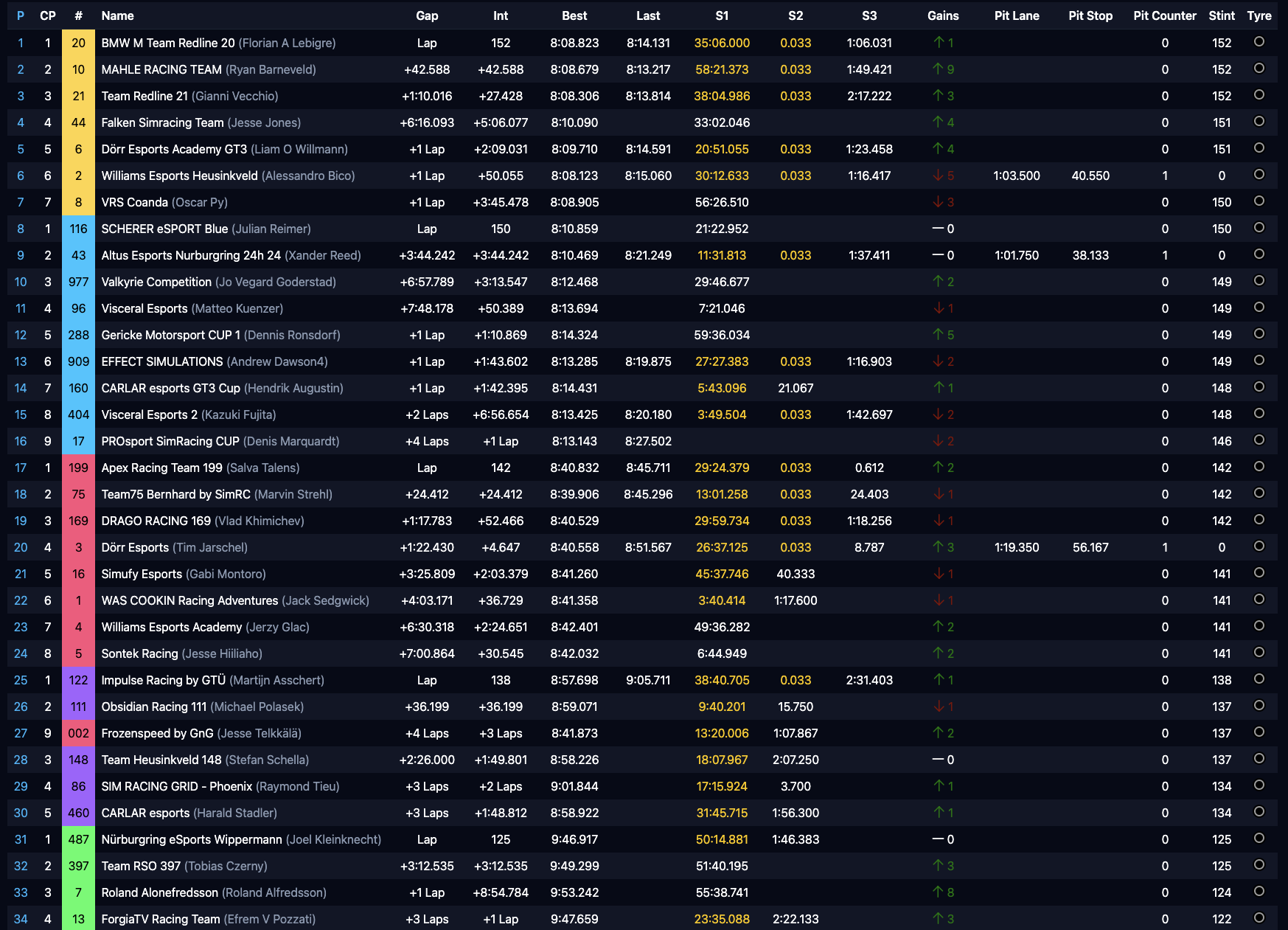
Entries which are greyed out are on pit road or no longer in the session.

Columns
The following columns exist in the timing table.
| Column Header | Description |
|---|---|
| P | Shows the current overall position of the entry. |
| CP | Shows the current position in class of the entry. |
| # | Shows the car number of the entry as well as indicating the car class by putting the class color on top a rectangle in the classes colors. |
| Name | Shows the name of the driver or team. In solo sessions, this simply shows the name of a driver. In team sessions this shows the name of the team followed by the name of the current driver in parenthesis. |
| Gap | Shows the overall gap of an entry to the class leader or overall leader in case there is only one class. Shows a time in minutes or seconds or laps in case the leader is more than a lap ahead of an entry. |
| Int | Shows the gap to the next car. Shows a time in minutes or seconds or laps in case the leader is more than a lap ahead of an entry. |
| Best | Shows the best lap time of an entry. |
| Last | Shows the last completed lap time of an entry. |
| S1 | Shows the sector 1 time of the current lap. Resets when the car crosses sector 1 again for the next lap. |
| S2 | Shows the sector 2 time of the current lap. Resets when the car crosses sector 1 again for the next lap. |
| S3 | Shows the sector 2 time of the current lap. Resets when the car crosses sector 1 again for the next lap. |
| Gains | Shows the positions gained or lost by the entry. A green arrow pointing upwards means the entry gained positions while a red arrow pointing downwards means the entry lost positions. A white dash means no changes. |
| Pit Lane | Shows the total time the car has been in pit lane during its last pit stop. |
| Pit Stop | Shows the total time the car has been stationary in its pit box during its last pit stop. |
| Pit Counter | Shows the total count of pit stops a car has done during the current session. |
| Stint | Shows the total number of laps a car has completed since its last pit stop. |
| Tyre | Shows the current tyre a car is using. |
Colored Times
Some time columns, such as sectors 1 to 3, best, and last may have different colors. The following colors are used:
- Magenta: marks a session absolute best time.
- Green: marks a personal best time.
- White/Black: marks a time without any improvement but also being the most recently recorded time. See sector times in the image above. White and black show depending on your light-mode/dark-mode setting.
- Yellow: marks a time without any improvement which is not the most recent time. See sector times in the image above.
Status Flags
There are several status flags which show the status for each entry next to their name.
Disqualified
A DSQ flag means that the entry has been disqualified from the race.

Black Flag
A BF flag indicates that an entry has a penalty which still needs to be served.

Meatball
An orange MB flag indicates that an entry's car has damage and needs repairing.
